Every year I start to program for my new classes, every year I try to make my collection of programs fit together, meet student outcomes and be clear, simple instructions for a teacher to follow. It always starts with my last template. Here’s a link to the first Excel spreadsheet I tried. This summer holiday I planned to simplify my process more and had the idea of using CS6 namely, Illustrator and InDesign to build a jigsaw’ish graphical program with ‘Outcomes’ and ‘Learn to’s’ and Learn About’s’ all connecting to activities, however, working with my prototype it became apparent that it would be rather unwieldy, although it did look pretty I must say. After getting rid of the little jigsaw tabs it became a little more workable. I still think I’ll play with the jigsaw idea in the future and one I have a colour A3 laser printer at my disposal I’m sure it will work.
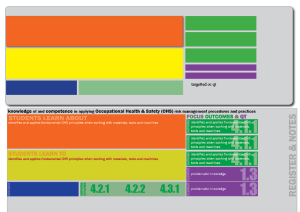
But as you can see, it looks very much like the cells of a spreadsheet. Back to the drawing board and time to load the last excel template I used… Program_Maker_V3, feel free to download it and modify and enhance it if you like it. It has the Outcomes for most of the TAS subjects built-in but is easy to modify to your own syllabus.
Recently I picked up the new Office 2013 suite and I must admit, it’s good, especially the fact that it supports widescreen monitors which might not seem like much but with my dual monitor setup and going from a word doc into an excel spreadsheet, the process is very smooth. I’ll try to capture the way I work with it as a tutorial in the future. So with some ideas from my prototype during the holidays and new modifications to my previous excel spreadsheet I think I may have improved my system and results. Here is the first program for 2013 which includes sheets for Resources, Evaluations, Outcomes(data) and a Scratch Sheet to try things. Feel free to clear the current data and insert you own. And if you do use anything from it please share with others. Now if you have any ideas to improve it please message me on Twitter @MrSully_
Download Graphics Tech Semester 1 2013

 Mr Sully's Blog