OK sometimes the simplest things can become the most painful. Finding simple A4 grid paper online took me to several commercial sites, sticking ads and cllickbait in my face and wasting my time behind paywalls. So I took a few minutes and made some of my own. A4/A3 5mm grid and isometric paper. Includes 10mm border and a simple titleblock. Send me request for any changes.
I saw a set of design icon stickers on a website and thought it was a great idea for a resource that could inspire students and to encourage more design thinking in class. I may also get students making their own in future classes.
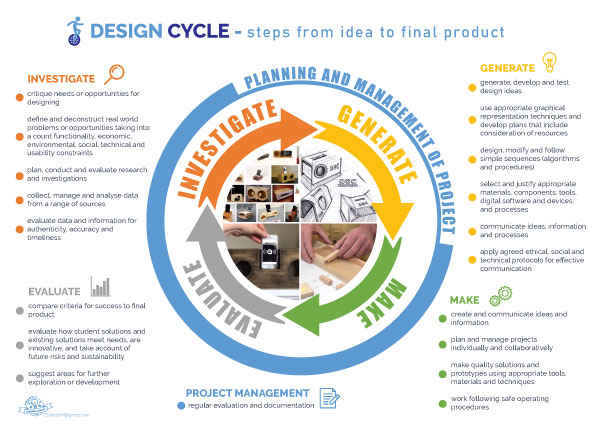
This is a new cleaner design for a simple design cycle. I plan to use the empty sheet as a little brainstorming exercise with students at the start of each project. Nothing new, but a fresh start. Let me know if you think there could be any changes, I’m sure there are many ways to improve. Click the image to download a full A3 document.
Three images on each slide and students need to decide which is out of place and why. There are no right or wrong answers, but they need thoughtful reasons based on what they can see in the pictures.
So looking back at those remote learning days I have found two small tasks that are a little hard to explain. I remember being quite excited as I made them and thought, I was pretty clever (well I was stuck in the garage talking to myself for months).
Anyway both these little presentations have a task for students to go out into nature and think creativily. You could easily do both these as a very chill class activity. You could also use music in the slides.
Both tasks have students looking for shapes and patterns. The first is the old favourite clouds but the second has a little twist.
During remote learning I made many small self contained creative tasks. I am in the process of cleaning them up and sharing them with my fellow teachers. Here are the first couple. There’s a simple rubrik included but these are probably better used as small formative activities. Once again use and change anyway you like.
One object 100 ways gets students to come up with interesting ideas on ways to use everyday items.
Organising Rules is the second one I’ve cleaned up. I remember making this as students went into isolation and were often confined to their room. Fun times…
Here’s a useful little PowerPoint presentation that I’ve just cleaned up. Very useful task to start students on their path to product design. There are a lot of videos included (hence the largish file size) the reason I’ve not linked directly to the online streaming source is, I’ve found the these sort of links generally break (disappear) leaving you with a non functioning presentation within a few semesters. Just move the files to your own Google Drive or similar and relink them if you like.
But feel free to relink them to their original online sources.
A little while ago Chris Betcher posted how early in his classes he gets students to measure a selection of Lego bricks to build measuring skills. Inspired by this and the paper rulers you get in IKEA, I made this worksheet that I’m sharing. There is one metric and one in imperial… Oh and Lego feels like a little of both which is strange but there are reasons as to how this has occurred, some research will uncover those reasons.
You need to print directly from the file without any scaling and probably best not to photocopy them either, or the built-in rulers may get distorted.
This was at a stage where I had introduced the class to Onshape as our CAD software and needed them to start dimensioning and using constraints in their designs. I reqquired an object they could recreate using an accurate scale and I remembered Chris’s tweet about measuring Lego pieces. I gave each student this sheet, a pencil and the same 4×2 Lego brick, took them outside and had them hold the brick on the built-in grid/ruler and freehand draw it using the isometric grid including the dimensions they would need to recreate the same thing in our CAD software.
Finished 3D CAD files were printed with 3D printers, with the ultimate evidence of success being, do they connect and hold (clutch power) to official Lego bricks. I guess it’s a reverse engineering task. I have evolved the task to include four different Lego pieces that students attempt to measure and recreate.
The idea of having a self-contained worksheet developed a little from desperation. My usual students are not very well equipped, having no rulers, set squares, compasses, protractors or pencils. They have Chromebooks, which sadly the students don’t usually have a good grasp of how to use them. This combined with them being left at home, broken, flat or just generally a tool for distraction.
OK over the last couple of years I’ve occasionally used Minecraft Education in the classroom to varying success. Sometimes it works, sometimes it falls in a big fat steaming heap and makes me hate life. I tend to keep it simple, with a build challenge… who can build the best tower? who can build a bridge? build a school!
So what I built was a simple flat creative world with 24 plots of land feel free to make more, although I think 30 concurrent players is the max. You collect your students usernames (I do this via a google form) and change the simple in-game code so each plot is only accessible by that student to prevent them destroying each others builds, sometimes I give a team access to work together. There is also a structure block on each plot that students can use to export their build as a 3D file which can be used with a 3D printer or perhaps in a Blender animation (which is how I mostly use it in my animation class).
There are lots of uses. Be warned though, students found a loophole in my first attempt to secure their areas. I quickly solved that one and prevented further bloodshed, however, recently they started using Ender Pearls to teleport into areas and be a menace.
To prevent this I made another command block with a /kill all ender pearls command, but this only works when you are near enough to activate that command. Then there are other ways of dealing with anti-social students, you can imprison them in game as a time out until they change their ways but it can quickly become a negative experience for everyone.
Use these files as you please, I’ve included an empty world, a sample of some student work and a PowerPoint which explains how to use it and change the code to suit. It should be pretty simple.
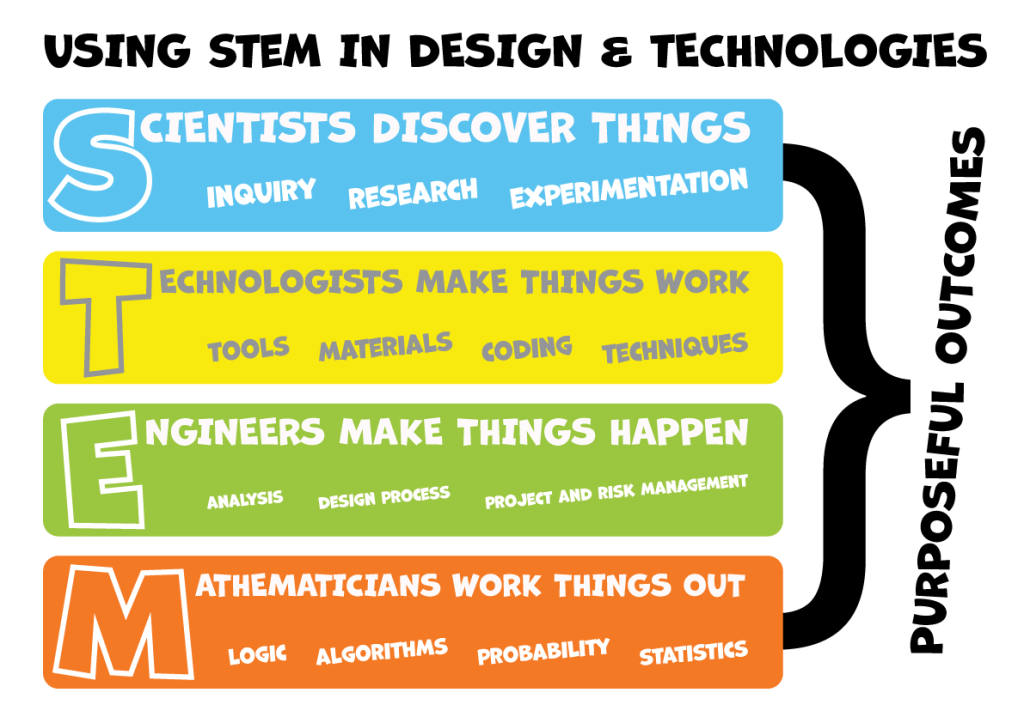
A kind colleague posted the content of this online last year, which I thank him for. I wanted to use the idea as a poster for my room so I’ve made it into a simple A3 PDF. Please share this freely and contact me if you have any ideas or changes that may make this better.






 Mr Sully's Blog